


Yousician: Learn & Play Guitar
4.438.06K Reviews
App Specs
- Version
- 5.37.0
- Updated On
- License
- Free
- Downloads
- 50,000,000+
- Developer
- Yousician Ltd.
- Categories
- Education
- Platform
- Android, iOS
Screenshots


 Analysis by AppCompare
Hey there, fellow music enthusiast! If you've ever found yourself itching to strum a guitar but felt a bit clueless about where to start, then Yousician: Learn & Play Guitar might just be your new best friend. Let me take you through my personal experience with this nifty app.
Getting Started with Yousician
First things first, downloading and setting up the app was a breeze. Available on both Android and iOS, Yousician is designed to cater to all levels, from complete newbies to seasoned players looking to refine their skills. I was pretty impressed by how user-friendly the interface is. Once you log in, you're greeted with a vibrant dashboard that screams "let's make some music!"
A Practice Routine That Fits Real Life
The most useful way to approach a guitar-learning app is to make practice small and repeatable rather than waiting for a perfect free afternoon. I’d set the guitar within reach, open a lesson, and work through one focused task before deciding whether to continue. That simple routine makes Yousician easier to return to: the app provides direction when I don’t want to spend my whole practice session choosing what to study.
A realistic weekday session might happen after dinner, with the guitar already tuned and ten or fifteen minutes available before the evening gets busy. I’d use that time to revisit a technique that still feels awkward, then try a song passage that uses it. The point isn’t to race through a course; it’s to leave with one thing feeling a little more familiar. If I have more time, I can keep going, but a short session still feels useful.
This style suits people who like clear prompts and quick feedback. It is less suitable if you want to improvise freely for most of your practice or already have a teacher assigning a detailed, individual plan. In that case, I’d treat the app as a supplementary practice aid rather than letting its sequence replace the work you and your teacher have agreed on.
Learning Made Fun
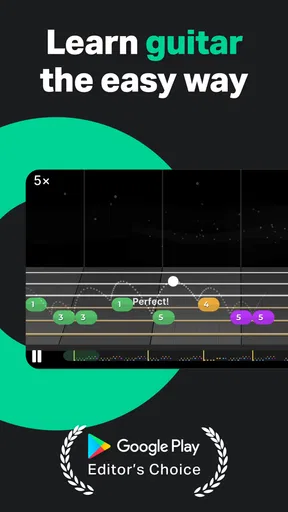
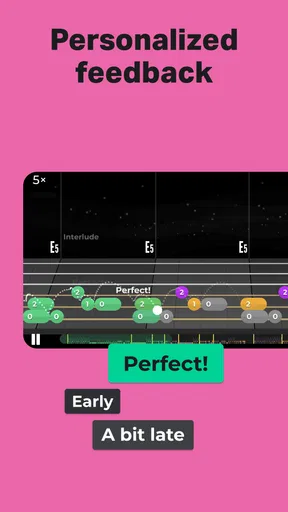
One of the coolest features is how interactive the lessons are. The app listens to you play and gives real-time feedback, which is super helpful. It’s almost like having a personal tutor right in your pocket. The lessons are gamified, so you feel like you're playing a game rather than practicing scales. Trust me, this makes a huge difference, especially on days when motivation is running low.
That immediate response is valuable, but it works best when I use it as a guide, not as the only judge of whether a note sounds good. A detected note can tell me whether I’m broadly on track; it cannot replace listening for a clean attack, a relaxed hand, or an even rhythm. I’d occasionally play the same phrase without looking at the screen, then compare how it feels and sounds. This helps prevent the score from becoming the whole purpose of practice.
Worth Reading Before You Choose

EA SPORTS FC Mobile 26 Is a Bigger Football Game, but It Takes Time

Flipboard Shows What News Apps Must Do Beyond the Feed

Switching to Android Auto Means Rethinking Your Driving Routine

Google Calendar Makes a Crowded Week Easier to Manage

Ludo King Makes the Most of the Minutes Between Plans

Baby Panda World Brings Quick Play to Modern Phones, but Its Game Library Feels Busy
If feedback seems inconsistent, I would first check the simple things: make sure the guitar is in tune, reduce competing background noise, and place the phone where it can hear the instrument clearly. A guitar played softly in a noisy room may be harder for a listening-based lesson to follow than a clear, deliberate attempt. Slowing down and separating a difficult phrase into smaller pieces can also make practice less frustrating, even when the app’s response is not perfect.
Settings Worth Checking Before You Settle In
Before building a routine around any lesson app, I’d take a moment to check the setup options and make sure the experience suits the instrument and the room. Confirm that the app is listening through the intended device, tune the guitar before practice, and try a short passage at a comfortable volume. These small checks can save time later because an avoidable setup problem can look like a playing mistake.
It also helps to decide what kind of practice you want from a session. If I’m learning a new movement, I’d give accuracy more attention than speed. If I’m revisiting a familiar part, I’d focus on playing it steadily and cleanly rather than chasing a perfect run immediately. Yousician’s guided format can keep a session moving, but my own goal still matters: a clear target makes it easier to notice whether I’m improving.
One practical trade-off is that a phone or tablet has to be positioned so I can see the prompts without twisting my posture or blocking the guitar. I’d arrange the screen before picking up the instrument, then leave it alone as much as possible. Reaching for it after every attempt breaks concentration, especially when I’m trying to keep a rhythm going. A stable setup makes the app feel more like a practice companion and less like a device I’m constantly managing.
Faster Patterns for More Focused Practice
When I want to use practice time efficiently, I avoid repeating a whole lesson from the beginning just because one part is troublesome. I identify the specific movement or transition that keeps breaking down, then return to that idea when it appears in a lesson or song. Once it feels more reliable, I try the surrounding passage again. This is a simple habit, but it keeps a short session from being swallowed by material I already understand.
I’d also alternate between a guided exercise and a song rather than treating those as separate worlds. The exercise gives me a chance to concentrate on a skill; the song shows whether I can use it in musical context. If a song is too demanding, I can step back to a more comfortable selection and work on timing or clean chord changes instead. Choosing an easier piece is not wasted practice if it lets me build control without repeatedly stumbling through the same difficult bar.
For motivation, I’d keep a modest personal benchmark: a transition that used to need a pause, a phrase I can now play more evenly, or a lesson I can finish with fewer stops. That gives progress a meaning beyond the app’s immediate feedback. Challenges can add a social nudge, but I wouldn’t let comparison with other learners decide whether my practice was worthwhile. People arrive with different instruments, schedules, and experience.
Song Choices and the Limits of a Guided Path
The song library can make practice feel more personal, but I’d choose tracks for what they help me learn, not just for familiarity. A song I like may still contain a rhythm or transition that is beyond my current comfort zone. I’d look for a manageable challenge: something that asks me to stretch without making the entire session a sequence of missed notes. It is perfectly reasonable to switch to a simpler selection and return to the harder one later.
Personalized lessons are helpful when I want a next step without planning a curriculum myself. They are not the same as a teacher watching my hands and adapting an explanation to a specific physical habit. If I keep getting stuck on the same issue, or feel discomfort while playing, I would pause and reconsider my technique rather than trying to push through because the app has another lesson ready. A qualified human teacher is the better choice for individual correction and questions that need a conversation.
There is also a difference between learning to follow a prompt and becoming comfortable playing away from one. I’d regularly finish a guided task and then try the same idea without staring at the screen. That small change encourages me to listen to the guitar and remember the movement rather than waiting for visual instructions. For someone whose goal is to play with other people or work out songs by ear, that independent listening practice is important alongside app lessons.
How It Compares with Other Ways to Learn
Compared with free video lessons, Yousician offers a more interactive structure: I can play along and receive a response instead of only watching someone demonstrate. The trade-off is that a video may give a fuller explanation or let me choose exactly which teacher and topic to follow, while an app’s guided route can feel more constrained. I’d use videos when I need to see a technique explained from a particular angle, and the app when I want a defined practice task and an immediate reason to pick up the guitar.
Compared with private lessons, the app is more convenient for fitting practice around an unpredictable schedule, but it cannot observe every detail of my posture or answer a follow-up question in its own words. A teacher can adapt to the person in front of them; an app is better understood as structured practice that is available when I am ready to work. Neither option has to replace the other. Someone taking lessons could use guided exercises between meetings, while a beginner on a tight schedule might start with the app and add personal instruction if they need more tailored help.
As an education app from Yousician Ltd., it has reached a broad audience, with more than 10 million installs and an average rating of 4.5 from around 516,000 ratings. It is free to download, though in-app purchases range from $1.99 to $209.99 per item. I’d explore the free experience and the practice style before spending money, then decide whether the available paid options make sense for how often I expect to use it. The age rating is Everyone, and version 5.22.0 supports operating systems from version 8.0 onward.
Who Will Get the Most from It
I think Yousician is strongest for a beginner who wants a clear starting point, a returning player who needs a nudge to practise consistently, or a self-directed learner who enjoys structured goals. The mix of lessons, songs, and listening feedback gives those players several ways to stay engaged. It can also work for someone with a busy routine who would rather complete a focused session at home than plan a longer lesson around a fixed appointment.
I would be more cautious if you already play confidently and mainly want advanced musical discussion, detailed correction, or freedom to build your own syllabus. A guided app can still provide a useful warm-up or a way to revisit fundamentals, but it may not be the most efficient centrepiece for an experienced guitarist. Likewise, if you dislike screen-led learning, find scoring distracting, or want to spend most of your time improvising, a teacher, a book, or a less structured practice approach may fit better.
For a first-time learner, the practical question is whether you have a guitar ready and are willing to practise regularly, even in short sessions. The app can help organize that effort, but it cannot make the instrument feel comfortable instantly. For someone who already owns a guitar, trying a short guided session is a sensible way to see whether the format suits them before committing to a longer routine or any in-app purchase.
Diverse Song Library
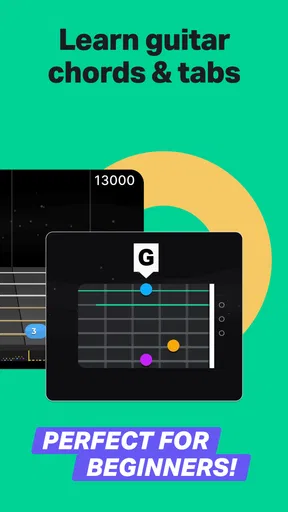
What's a music app without a killer song library, right? Yousician doesn’t disappoint. From rock classics to pop hits, there's something for everyone. You can choose songs based on your skill level, which means you won't be stuck playing "Twinkle, Twinkle, Little Star" forever. I was jamming to some Beatles tunes in no time!
Personalized Learning Paths
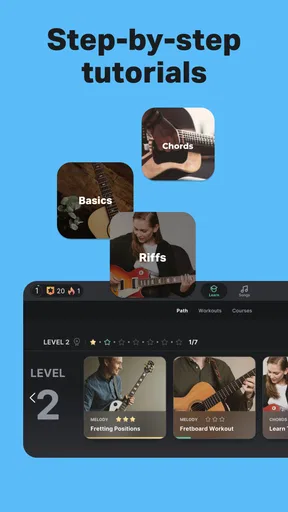
Another feature I loved is the personalized learning paths. The app assesses your skill level and tailors lessons accordingly. It's a clever way to ensure you're always challenged but not overwhelmed. Plus, they throw in some theory lessons, which I found surprisingly engaging. Who knew learning about chord progressions could be this fun?
Community and Challenges
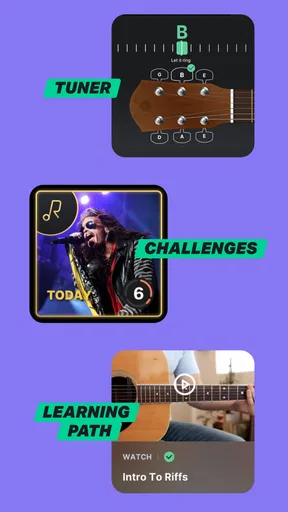
Connecting with other learners is a breeze through the app's community features. You can participate in weekly challenges, which are a great way to test your skills and see how you stack up against other users. It’s like a friendly competition that keeps you motivated and focused.
My Verdict on Building a Lasting Habit
To wrap it up, if you're looking for an app that blends learning with fun, Yousician is a solid choice. Whether you're just starting out or looking to polish your skills, this app makes the journey enjoyable and rewarding. So grab your guitar, download the app, and start strumming away!
My strongest recommendation is to judge it by whether it helps you return to the guitar, not by how quickly you move through lessons. Set up the instrument and screen before you begin, choose a goal for each session, and occasionally repeat a skill without relying on the prompts. Those habits make the interactive format more useful while keeping your ears and hands involved.
For me, its value lies in making practice easier to start and giving a learner a path when the next step feels unclear. It is not a substitute for every kind of instruction, and its guided feedback has limits, but that balance is easy to understand once you know what you want from it. If structure and song-based practice sound appealing, it is worth trying; if you need close personal correction or complete freedom, I’d look elsewhere or pair it with another approach.
Pros
- Interactive and engaging lessons.
- Wide range of instruments supported.
- Real-time feedback on performance.
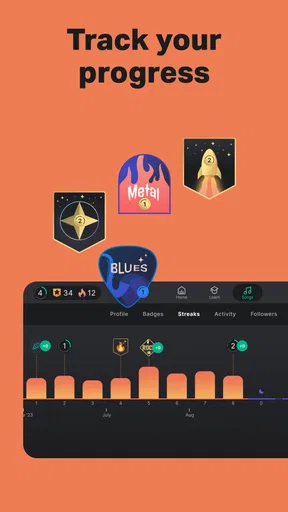
- Progress tracking and goal setting.
- User-friendly interface and design.
Cons
- Requires a subscription for full access.
- Limited free lessons available.
- Needs consistent internet connection.
- May not suit advanced musicians.
- Ads can be intrusive in free version.
FAQs for Yousician: Learn & Play Guitar
Is Yousician suitable for complete beginners?
Yes, Yousician is designed for all skill levels, including complete beginners. The app offers step-by-step lessons starting from the basics, allowing users to learn at their own pace. Interactive tutorials and exercises make it easy for beginners to pick up guitar techniques and progress gradually.
Do I need any additional equipment to use Yousician?
While Yousician works best with a real guitar, you don’t need any additional equipment. The app uses your device’s microphone to listen as you play, providing feedback in real time. A stable internet connection is recommended for accessing the full range of lessons and songs.
Can I use Yousician offline?
Yousician requires an internet connection to access its full library of lessons and songs. However, some content may be downloaded for offline use depending on your subscription level. Always ensure you have the latest version of the app to access any offline features available.
What types of songs and genres does Yousician offer?
Yousician offers a diverse library of songs across various genres, including rock, pop, classical, and more. Users can choose songs that match their skill level and personal taste. The app regularly updates its library, so there’s always something new to learn and play.
Is there a free version of Yousician, and what are the limitations?
Yousician offers a free version with limited daily lesson time and access to a smaller selection of songs. For an unlimited experience, users can subscribe to a premium plan, which provides unrestricted access to all lessons, songs, and personalized learning paths.


